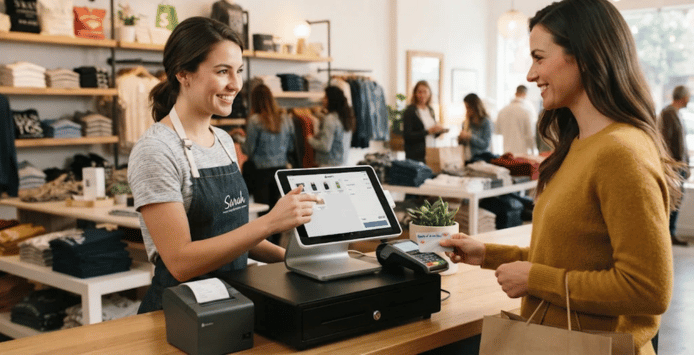
What is point of sale? It is the place and moment where a customer completes a purchase. Modern POS technology also records the transaction and can connect payments, inventory, customer information, and business reporting.
A POS system can be as simple as tablet software with a card reader. Larger businesses may use multiple terminals, scanners, printers, cash drawers, and connected back-office software. The right setup depends on how, where, and what a business sells.
Direct answer: A POS system combines software and hardware to complete sales and record transaction information. It can calculate totals, accept payments, issue receipts, and update inventory after a purchase. Modern systems may also connect sales reports, customer records, employee tools, accounting software, and online stores.
POS at a Glance
| Topic | What it means |
|---|---|
| POS | Short for “point of sale” |
| Main purpose | Complete and record customer transactions |
| Common hardware | Terminal, tablet, card reader, scanner, cash drawer, receipt printer |
| Common software | Checkout, inventory, reporting, customer, and employee tools |
| Payment options | Cash, cards, contactless payments, and digital wallets |
| Business types | Retailers, restaurants, service businesses, mobile sellers, and ecommerce brands |
| Main benefit | Sales and operational information can stay connected |
| Key consideration | Features, processing fees, integrations, security, and reliability |
Key Takeaways
- POS means the time and place where a customer completes a purchase.
- A modern system usually includes both checkout software and payment hardware.
- Many platforms track inventory automatically after every recorded sale.
- Cloud systems can let owners review business information away from the store.
- Payment processing charges and software subscriptions affect the total operating cost.
- U.S. merchants should consider tax settings, recordkeeping, and payment-data security.
- The best setup is based on business needs rather than the longest feature list.
What Is Point of Sale, and What Does POS Mean?
POS stands for the location or stage where a sale becomes complete. In a physical store, that may be a checkout counter. For a mobile seller, it can be a phone or tablet at an event.
Online stores also have a checkout stage where customers submit payment and complete an order. The technology behind that transaction records the sale and starts related business processes. Those processes may include inventory changes, receipts, reports, and accounting updates.
The term can also describe the complete system a merchant uses at checkout. That system often combines software with physical equipment. Modern platforms therefore do much more than traditional cash registers.
How Does a POS System Work?
A typical transaction starts when a cashier scans or selects the product being purchased. The software retrieves the price and applies any configured discounts. It also calculates applicable taxes based on the merchant’s settings.
The customer then selects a payment method, such as cash or a credit card. For electronic payments, the payment service sends an authorization request through the necessary financial networks. An approved transaction lets the merchant finish the sale.
The software records the completed purchase and can adjust available inventory. It may also produce a printed or digital receipt. Sales reports then give the business a record of transaction activity.
This connected recordkeeping can reduce duplicate data entry across several systems. The IRS recognizes electronic systems, including POS software, as possible business recordkeeping tools. Businesses still need complete and accurate records that remain accessible when required.
The Main Parts of a POS System
POS software provides the digital tools employees use during checkout. It can contain product catalogs, prices, tax settings, discounts, and payment options. More advanced systems may include inventory controls, scheduling, loyalty programs, and reporting.
Hardware gives employees and customers a physical way to interact with the system. A small operation might need only a smartphone and payment reader. A busy store may need several devices at each checkout station.
Common hardware can include:
- Touchscreen terminal or tablet
- Credit and debit card reader
- Barcode scanner
- Receipt printer
- Cash drawer
- Customer-facing display
- Kitchen printer or display for restaurants
- Mobile handheld checkout device
Not every business needs every device on this list. A service company may have little need for barcode scanning or a cash drawer. Retail stores with large inventories may find both tools essential.
POS System Versus a Traditional Cash Register
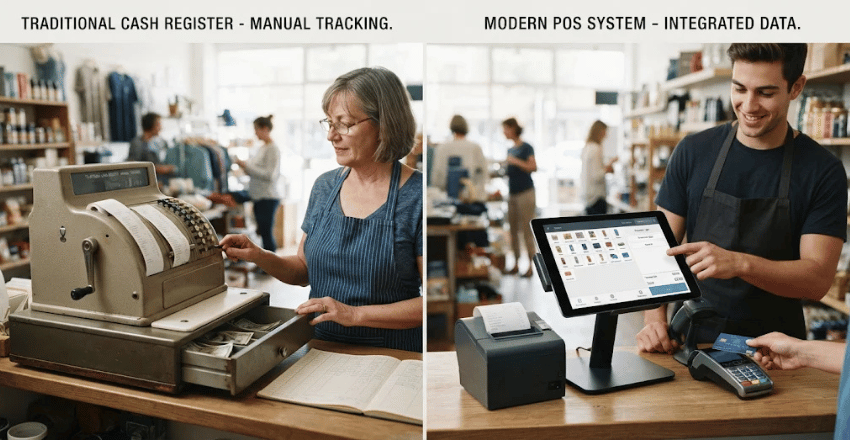
A cash register mainly records sales totals and stores physical cash. Modern POS software can link sales to other operational information. This difference becomes important as a business adds products, employees, or sales channels.
| Capability | Traditional cash register | Modern POS system |
|---|---|---|
| Record sales | Yes | Yes |
| Accept cash | Yes | Yes |
| Accept card payments | Requires added equipment | Commonly integrated |
| Track inventory | Limited or manual | Often automatic |
| Sales reporting | Basic | Detailed |
| Customer records | Usually no | Often available |
| Online integrations | Rare | Common |
| Remote access | Usually no | Often available with cloud systems |
This broader functionality can matter for businesses managing stock across several channels. EvoBlogs’ guide to logistics and supply chain management explains why inventory information affects wider operations. Accurate checkout records can provide useful data for those processes.
Common Types of POS Systems
Countertop systems remain common in retail stores and restaurants. They usually have a fixed terminal and connected payment equipment. Businesses with steady checkout locations often prefer this arrangement.
Mobile POS systems run on smartphones, tablets, or handheld terminals. They work well for food trucks, markets, events, and tableside restaurant service. Employees can complete transactions without sending every customer to one counter.
Cloud-based systems store and synchronize business information through online infrastructure. Authorized users may review reports or manage products from other locations. Some providers also offer offline transaction functions when internet connectivity becomes unavailable.
Industry-specific systems include features designed around a certain business model. Restaurants may need table management, kitchen routing, and tipping features. Automotive retailers may connect sales with customer, inventory, and service information.
EvoBlogs’ overview of Tekion and automotive retail technology shows how connected systems can extend beyond checkout. Automotive businesses often coordinate inventory, customer records, sales, service, and financial functions. That illustrates why some merchants need specialized software instead of a generic checkout application.
What Can a Modern POS System Do?
Payment acceptance remains the core function, but software capabilities have expanded. A merchant can often see sales totals by product, employee, location, or time period. That information may help managers identify patterns and make operating decisions.
Inventory tools can reduce stock quantities after each completed transaction. Some systems can also notify employees when products reach selected reorder levels. These features are especially useful when a store carries many individual items.
Customer-management features may store contact information and purchase history when customers provide permission. Businesses can use those records for loyalty programs or service follow-ups. Privacy practices should match applicable laws and the information being collected.
Employee features can include individual logins, time tracking, permission controls, and sales reporting. Restaurants may also need tip management or shift functions. Each added feature can reduce the need for separate software.
How Much Does a POS System Cost?
There is no single U.S. price because providers use different pricing structures. Businesses can face hardware purchases, monthly software subscriptions, payment-processing charges, and optional add-on fees. A low upfront price therefore does not always mean a lower long-term cost.
Some providers offer basic software without a separate monthly subscription. They may instead earn revenue through payment-processing fees or optional services. Other platforms charge monthly rates based on locations, terminals, users, or advanced features.
Hardware costs vary because a merchant may already own compatible equipment. A small mobile seller might need only a card reader. A multi-lane retailer could require terminals, printers, scanners, displays, and networking equipment.
Businesses planning a new location should budget technology alongside permits and operating costs. EvoBlogs’ Washington State business license guide shows how business startup expenses can extend beyond equipment. Local licensing and compliance costs can affect the complete opening budget.
Restaurant operators can face even larger technology budgets because they may require several specialized stations. EvoBlogs’ Raising Cane’s franchise cost overview includes POS technology among potential restaurant startup expenses. Actual system costs should always come from current provider quotes.
POS Security and U.S. Business Considerations
Businesses accepting payment cards need to protect customer payment information. The PCI Security Standards Council publishes standards for organizations that handle cardholder data. PCI DSS v4.0.1 remains the currently published standard in its document library.
A secure POS setup should use supported software and properly configured payment equipment. Businesses should control staff access and install security updates when required. Network design also deserves attention when checkout devices share business connectivity.
Sales tax is another practical issue for U.S. merchants. A system can calculate configured taxes, but the merchant remains responsible for correct tax settings. State and local requirements can differ based on location and business activity.
Reliable recordkeeping matters even when software handles the calculations. Business owners should regularly review transaction reports and settlement information. They should also confirm that connected accounting records match actual deposits and sales activity.
How to Choose the Right POS System
Start with the transactions your business handles every day. Write down required payment methods, sales channels, inventory needs, and employee workflows. This prevents attractive extras from distracting you from essential functions.
Next, calculate the complete cost rather than the advertised subscription alone. Include hardware, processing rates, monthly charges, add-ons, support, and replacement equipment. Ask whether contracts or early termination charges apply before signing.
Check how the system connects with software you already use. Accounting, ecommerce, inventory, payroll, and scheduling integrations can reduce repeated manual work. Poor integrations can create extra work even when the checkout experience is good.
Finally, evaluate security, customer support, offline options, and data portability. Ask what happens when internet service fails or hardware stops working. Also learn how you can export business records before committing to a platform.
When Does a Small Business Need a POS System?
A simple cash-only business can operate without sophisticated checkout software. The need grows when transactions, inventory, employees, or reporting become harder to manage manually. Accepting several payment methods can also make an integrated system more useful.
Retailers often benefit early because every sale can affect available stock. Restaurants gain value from ordering, kitchen, tipping, and employee features. Service businesses may prioritize appointments, invoicing, and mobile payment acceptance instead.
The practical question is whether the system saves more time and reduces more errors than it costs. Compare your current process with the proposed setup. Choose tools that solve existing operating problems before paying for advanced features.
Frequently Asked Questions
What is point of sale in simple terms?
It is where and when a customer completes a purchase from a business. The term can also describe the technology used to process that purchase. That technology commonly records payment, sales, and inventory information.
Is a POS system the same as a card reader?
No, a card reader is only one possible part of the setup. It captures information needed for an electronic payment. The larger system can also handle products, taxes, receipts, inventory, customers, and reports.
Can a POS system work without the internet?
Some systems provide offline features, but their capabilities vary by provider. Certain electronic transactions may remain pending until connectivity returns. Merchants should confirm offline limitations before choosing a platform.
Do online businesses use POS systems?
Yes, especially businesses that sell both online and in physical locations. Connected systems can synchronize products, inventory, orders, and customer information across channels. Pure ecommerce businesses may instead use checkout and commerce platforms without traditional store hardware.
Does a POS system automatically handle sales taxes?
Software can calculate taxes using rates and rules configured in the system. It does not remove the merchant’s responsibility for accurate tax treatment. Businesses should confirm requirements with their state or qualified tax adviser.
The Bottom Line
POS technology has evolved from a digital cash register into a broader business-management tool. It can connect checkout activity with inventory, reporting, payments, and customer information. The value depends on choosing features that match how the business operates.
For a U.S. business owner, cost is only one part of the decision. Security, tax configuration, integrations, reliability, and recordkeeping also deserve careful review. Compare several providers using the same requirements before selecting a system.
The next step is to list your daily checkout needs and current operational problems. Compare those requirements against several systems and their full costs. A focused comparison makes it easier to avoid paying for features your business will never use.