Introduction
Apple’s iOS, the operating system powering millions of iPhones worldwide, has undergone significant transformations since its inception. Each iteration brings innovation, enhanced performance, and user-centric features. iOS 18, the latest version, continues this tradition, offering a plethora of advancements that promise to redefine the user experience and significantly impact the mobile ecosystem. This article will delve into the notable features, improvements, and the profound impact of iOS 18 on the mobile ecosystem.
iOS 18 Overview
iOS 18 marks a transformative leap in Apple’s mobile operating system, blending innovation, enhanced user privacy, and seamless integration with the broader ecosystem. This latest release brings a refined visual interface with smoother animations and customizable home screens that allow for greater personalization. Performance improvements ensure faster app launches and extended battery life, supported by proactive resource management. Privacy is further fortified with a comprehensive Privacy Dashboard and advanced encryption protocols.
Refined Visuals
iOS 18 introduces a refined visual language that builds on the aesthetic introduced in previous versions. Apple has embraced a more fluid and dynamic interface with smoother animations and transitions. The updated design emphasizes clarity and ease of use, focusing on accessibility.
Customizable Home Screen
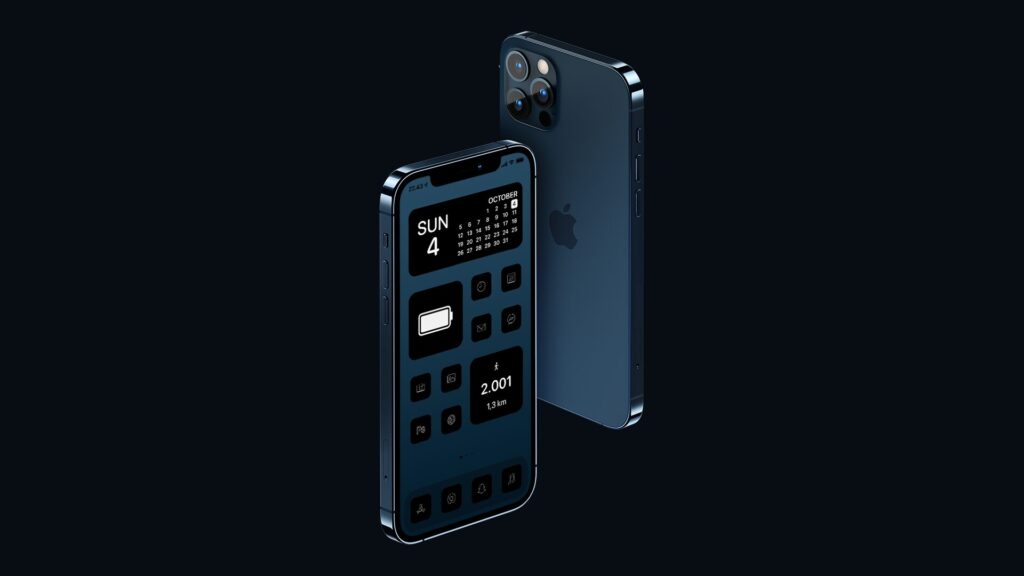
Building on the customizability introduced in iOS 14, iOS 18 allows users even more flexibility with their home screens. Widgets are now more interactive and can be resized according to user preference. Additionally, a new feature called “Smart Stacks” uses machine learning to display relevant widgets based on time, location, and activity.
Dynamic Wallpapers
Dynamic wallpapers have been enhanced in iOS 18, offering a range of live backgrounds that change throughout the day. These wallpapers are aesthetically pleasing and adapt to the dark and light modes, providing a cohesive look that blends seamlessly with the rest of the interface.
What iOS 18 Brings to the iPhone Experience
iOS 18 delivers a polished, modern update for iPhone users by refining core system features and improving overall usability. With a focus on smoother performance, enhanced security patches, and better stability, it ensures that devices run efficiently while protecting user data. The update also typically includes interface tweaks and optimizations — from smoother animations to cleaner navigation — making everyday tasks feel more fluid. Additionally, iOS 18 supports a broad range of apps while extending compatibility for supported iPhone models, ensuring users benefit from new software without losing access to their favorite tools.
Speed and Efficiency
Apple has always prioritized performance, and iOS 18 is no exception. The operating system is optimized and supercharged for faster app launch times, improved battery life, and smoother multitasking. Apple’s use of the latest A-series chips and software optimizations ensures that even older devices see a significant performance boost, reassuring you that your device is always up to the task.
Proactive Resource Management
iOS 18 introduces a new proactive resource management system that intelligently allocates system resources based on usage patterns. This system learns from the user’s habits and dynamically adjusts CPU and GPU usage, ensuring optimal performance without unnecessary power drain.
Enhanced Privacy Features
Privacy has been a cornerstone of Apple’s philosophy, and iOS 18 takes it to the next level. A new Privacy Dashboard provides a comprehensive overview of app permissions and data access. Users can easily see which apps have accessed sensitive information and revoke permissions as needed.
Advanced Encryption
iOS 18 features advanced encryption protocols that protect user data more robustly than ever. End-to-end encryption is standard for all communications, including messages, emails, and FaceTime calls. Additionally, a new Secure Storage feature encrypts sensitive files and requires biometric authentication for access.
App Tracking Transparency 2.0
Building on the groundwork laid by previous versions, iOS 18 enhances App Tracking Transparency (ATT). Users now receive more detailed information about how their data is used and can make informed choices about which apps to grant tracking permissions. This update also includes new safeguards to prevent apps from circumventing these privacy measures.
Augmented Reality (AR) Enhancements
Apple continues to push the boundaries of AR with iOS 18. The ARKit 6 introduces new tools for developers to create more immersive and interactive AR experiences. These improvements include enhanced environmental understanding, more precise object placement, and realistic rendering of virtual objects.
AI and Machine Learning
Artificial intelligence and machine learning are deeply integrated into iOS 18, powering features such as Siri, image recognition, and predictive text. The new AI capabilities allow Siri to understand context better and provide more accurate and helpful responses. Additionally, on-device machine learning processes data faster and more securely.
Health and Wellness
The Health app has received a significant overhaul in iOS 18, with new features promoting user wellness. A comprehensive mental health tracker monitors mood and stress levels, offering insights and recommendations based on daily patterns. Sleep tracking has also been improved, providing more detailed analysis and personalized tips for better rest.
Advanced Messaging
Messages in iOS 18 introduce several new features to enhance communication. Users can now set specific statuses, such as “Busy” or “In a Meeting,” which are visible to contacts. Additionally, a new translation feature allows for real-time translation of messages in multiple languages, breaking down communication barriers.
Continuity and Handoff
Continuity features in iOS 18 have been refined to offer a more seamless experience across Apple devices. Users can start an activity on one device and effortlessly continue it on another. This includes support for Handoff with calls, emails, and even certain third-party apps.
Universal Control
Universal Control, first introduced with macOS Monterey, is now fully integrated with iOS 18. This feature allows users to control multiple Apple devices with a single set of peripherals, such as a keyboard and mouse. It’s a powerful tool for users who operate in a multi-device ecosystem, enhancing productivity and convenience.
Enhanced App Store Experience
The App Store in iOS 18 offers a more personalized and user-friendly experience. Enhanced search capabilities use machine learning to deliver more accurate results. A new “For You” section also curates app recommendations based on user interests and activity.
Developer Tools
iOS 18 brings a host of new tools and APIs for developers. Swift 6, the latest iteration of Apple’s programming language, offers improved performance and new features to streamline development. The updated Xcode provides better debugging tools and support for building more complex and powerful apps.
Sustainability Initiatives
Apple continues its commitment to environmental sustainability with iOS 18. The operating system is designed to be more energy-efficient, reducing Apple devices’ overall carbon footprint. Apple’s supply chain and manufacturing processes also aim to use more recycled materials and reduce waste.
Energy-Efficient Features
iOS 18 includes several features that extend battery life and reduce energy consumption. These include more competent background activity management, adaptive screen brightness, and efficient power use in apps and system processes.
Additional features in iOS 18 include
Enhanced Augmented Reality (AR): iOS 18 enhances AR experiences with improved object detection, more realistic rendering, and enhanced interactivity, leveraging the capabilities of ARKit 6.
- Advanced Siri Capabilities: Siri in iOS 18 is more intuitive and capable, with enhanced natural language processing and improved contextual understanding for more personalized assistance.
- Advanced Messaging Features: New messaging features include real-time language translation, expanded emoji options, and retracting sent messages within a specific timeframe.
- Improved Multitasking: iOS 18 introduces enhancements to multitasking capabilities, allowing users to manage multiple apps and tasks more efficiently simultaneously.
- Expanded Accessibility Tools: iOS 18 includes new accessibility features such as Assistive Touch enhancements, focus background sounds, and VoiceOver improvements for more seamless navigation.
- Updated Maps: Apple Maps in iOS 18 offers more detailed maps in additional regions, improved navigation guidance, and enhanced transit information.
- HomeKit Enhancements: iOS 18 expands HomeKit capabilities with new automation suggestions, improved compatibility with smart home devices, enhanced security focus background sounds, and VoiceOver improvements features.
- Updated Safari Browser: Safari in iOS 18 features a redesigned tab bar, improved tab management, and enhanced privacy controls for a more secure browsing experience.
- Music and Podcasts: The Music app and Podcasts app receive updates with improved discovery features, personalized recommendations, and enhanced playback controls.
- Privacy Enhancements: Building on existing privacy features, iOS 18 introduces additional privacy controls for microphone and camera access and enhanced tracking prevention in Safari.
New Levels of Customization and Capability
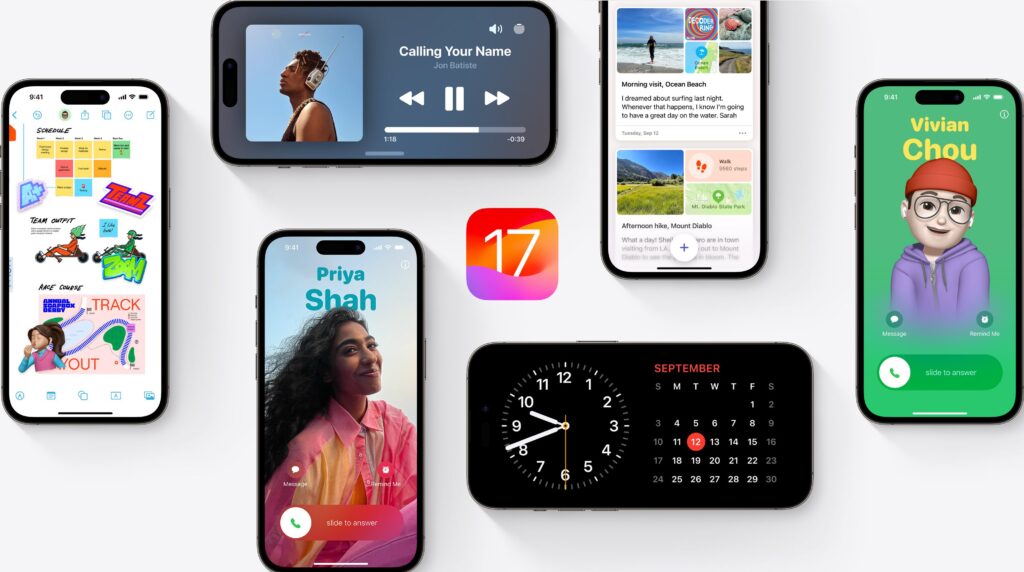
iPhone users now have additional customization options for the Control Center, Lock Screen, and Home Screen. They can arrange widgets and apps in any available area on the Home Screen. For example, they can arrange them to perfectly frame a wallpaper or sit directly above the dock for convenient access. Users can customize their experience by making app icons and widgets appear more prominent and giving them a dark or tinted effect.
Photos Get a Unified View
Photos have had their most significant redesign to date, making it easier for users to find and revisit memorable moments. The familiar grid is presented in a simplified single view, and new collections allow users to browse content by theme without arranging it into albums. Additionally, collections can be pinned to maintain easy access to favorites.
Libraries come to life through autoplaying content, allowing users to browse while relishing in memories. Since every user has a different photo library, the app will enable users to personalize it by organizing collections, pin collections for easy access, and displaying their most valued photos in a carousel view.
Powerful Ways to Stay Connected in Messages
All-new text effects are added to iMessage, enhancing any letter, word, phrase, or emoji with lively, animated appearances to make conversations come to life. Users can more effectively convey their tone using bold, underlining, italics, and strikethrough formatting tools. Tapbacks now allow users to compose messages and schedule them to be sent later.
Enhancements to Mail
Mail will roll out new inbox management and update features later this year. Incoming emails are sorted and organized into Primary for personal and urgent emails, Transactions for confirmations and receipts, Updates for news and social media notifications, and Promotions for marketing emails and coupons using on-device categorization. Additionally, Mail has a new digest view that compiles all of a company’s pertinent emails so users can quickly scan for urgent content.
Big Updates to Safari
Highlights and a revamped Reader experience make it even simpler to find information online with Safari, the fastest browser in the world. Safari can surface important webpage information through machine learning. Users can listen to an artist’s track directly from an article about the song or album, or they can quickly see the location of a restaurant, hotel, or landmark by reading the summary of the article. A table of contents and synopsis are provided for lengthier articles in Reader, redesigned to provide even more ways to read articles without interruption.
New Privacy Features Designed to Empower Users
With tools to control who can see their apps, how contacts are shared, and how their iPhones connect to accessories, iOS 18 offers users even more control. Apps that are hidden or locked assure users that private information—like content and notifications—won’t accidentally be viewed by unauthorized parties. Apps can now be closed, and users can move them to a locked, hidden apps folder to hide them for even more privacy.
Read More: – Samsung Galaxy S24 Ultra: The Ultimate Flagship Smartphone, Specifications, Price, Market, Comparison and Much More
Conclusion
iOS 18 represents a significant mobile operating system technology step forward, blending innovation with user-centric enhancements. From refined visuals and performance improvements to advanced privacy features and integration with the broader Apple ecosystem, iOS 18 is designed to provide a seamless, secure, and highly personalized user experience. As Apple continues to push the boundaries of what’s possible with mobile technology, iOS 18 stands as a testament to its commitment to excellence and innovation.
Apart from that if you want to know about “iPhone Stuck in SOS Mode” then please visit our “TECH” Category
FAQs
Yes, iOS 18, like previous iOS updates, is free to download and install on compatible devices. To update to the latest version, follow your device’s settings steps.
iOS 18 was released in. Apple releases major updates to its operating system annually, typically in the fall.
Most apps should work seamlessly on iOS 18. However, checking for updates for your apps after upgrading is always a good idea to ensure compatibility with the latest iOS version.
Many users experience better battery efficiency after updating due to system optimizations. However, battery behavior may vary depending on usage, settings, and device age.
Major iOS updates often expand personalization options, such as home screen adjustments, lock screen tools, accessibility upgrades, or theme refinements.